Lecture 13 Device Management

Section 1 The Interfaces of Devices


Xiang Yong, Chen Yu, Li Guoliang, Ren Ju


Spring 2023

Outline

  • Problems to be solved
  • Kernel I/O architecture
  • Common types of device interfaces
  • Device access characteristics
  • Device transfer methods
  • I/O execution model

I/O subsystem -- Problems to be solved

  • Why are devices so different?
  • Why do we need to manage devices?
  • How to unify the access interface to devices?
  • Why do we need to abstract devices?
  • How to perceive the states of the devices and manage them?
  • How to improve the accessibility between CPU and devices?
  • How to ensure the reliability of I/O operations?

I/O subsystem -- Kernel I/O Architectures

I/O subsystem -- Common device interface types

  • Development history of devices:
    • Simple devices: CPU can directly control I/O devices through I/O interfaces
    • Multi-devices: A layer of I/O controller and bus is added between CPU and I/O devices
    • Devices with interrupt supports: improve CPU utilization
    • High throughput devices: DMA support
    • Various other devices: GPU, sound card, SmartNIC, RDMA
    • Connection methods: direct connection, (device/interrupt) controller, bus, distributed

I/O subsystem -- Common Types of Device Interfaces

  • Common devices: character devices, block devices, network devices


Embedded development boards that include the above peripherals

I/O subsystem -- Common Types of Device Interfaces

Character devices: such as GPIO, keyboard/mouse, serial port, etc.


GPIO LED light

I/O subsystem -- Common Types of Device Interfaces

Character devices: such as GPIO, keyboard/mouse, serial port, etc.


keyboard

I/O subsystem -- Common Types of Device Interfaces

Character devices: such as GPIO, keyboard/mouse, serial port, etc.

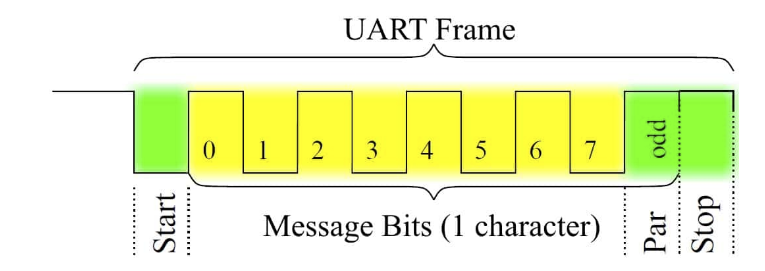
UART serial communication

I/O subsystem -- Common device interface types

Block devices: such as: disk drives, tape drives, optical drives, etc.

Disk

I/O subsystem -- Common Types of Device Interfaces

Network devices: such as ethernet, wifi, bluetooth, etc.

Network card

I/O Subsystem -- Characteristics of Accessing Devices

Character devices

  • Sequential access in units of bytes
  • I/O commands: get(), put(), etc.
  • Typically accessed using file access interfaces and semantics

I/O Subsystem -- Characteristics of Accessing Devices

Block device

  • Uniform access to data blocks
  • I/O commands: raw I/O or file system interfaces, memory mapped file access
  • Typically accessed using file access interfaces and semantics

I/O Subsystem -- Characteristics of Accessing Devices

Network device

  • Formatted message exchange
  • I/O commands: send/receive network packets, support multiple network protocols through the network interface
  • Typically uses socket access interface and semantics

I/O subsystem -- Device Transfer Modes

  • Programmed I/O (PIO)

  • Interrupt based I/O

  • Direct Memory Access (DMA)

I/O subsystem -- Device Transfer Modes

Programmed I/O(PIO, Programmed I/O)

  • Port-mapped PIO (PMIO): use CPU in/out instructions
  • Memory-mapped PIO (MMIO): transfer all data via load/store operations
  • Simple hardware, easy programming
  • CPU time and data transfer are proportional
  • Suitable for simple, small-scale device I/O
  • I/O device notifies CPU: polling in PIO mode

I/O subsystem -- Device Transfer Modes

Interrupt Transfer Modes

  • I/O devices send interrupt request signals to notify the CPU.
  • The number of interruptible devices and interrupt types gradually increase
  • Set CPU and interrupt controller.
  • More complex programming
  • High CPU utilization
  • Suitable for more complex I/O devices
  • I/O device notifies CPU: Reminder in interrupt mode

I/O subsystem -- Device Transfer Modes

Interrupt Transfer Modes

I/O subsystem -- Device Transfer Modes

DMA transfer Mode:

  • Device controllers have direct access to the system bus
  • Controllers transfer data directly to and from memory
  • Set CPU and interrupt controller.
  • More complex programming, requires CPU involvement in settings
  • Device transfers data without affecting the CPU
  • Suitable for high-throughput I/O devices

I/O subsystem -- CPU and Device connection

I/O Subsystem -- Example of reading disk data

I/O subsystem -- Lifetime of I/O requests

I/O Subsystem -- I/O Execution Model -- Interaction Protocol of I/O Interface

Polling-based Abstract Device Interface: Status Command Data

I/O Subsystem -- I/O Execution Model -- Interaction Protocol of I/O Interface

Interrupt-based Abstract Device Interface: Status Command Data Interrupt

I/O Subsystem -- I/O Execution Model -- Device Abstraction

File-based I/O device abstraction

  • Access interface: open/close/read/write
  • Special system calls: ioctl: input/output control
  • ioctl is flexible, but too flexible, with no regularity in defining request codes
  • File interface is too user application-oriented and does not cover the process of managing devices by the OS

I/O Subsystem -- I/O Execution Model -- Device Abstraction

Stream-based I/O device abstraction

  • A stream is a full-duplex connection between a user process and a device or pseudo-device
  • Special system calls: ioctl: input/output control
  • ioctl is flexible, but too flexible, with no regularity in defining request codes
  • Dennis M. Ritchie wrote "A Stream Input-Output System", 1984

I/O Subsystem -- I/O Execution Model -- Device Abstraction

virtio-based I/O device abstraction

  • Rusty Russell proposed the general I/O device abstraction – virtio specification in 2008
  • The virtual machine provides the implementation of the virtio device, and the virtio device has a unified virtio interface
  • As long as the OS can implement these common interfaces, it can manage and control various virtio devices

I/O Subsystem -- I/O Execution Model -- Classification

When a user process issues a read I/O system call, it mainly goes through two stages:

  1. Wait for the data to be ready;
  2. Copy the data from the kernel to the user process
  • Process execution status: blocking/non-blocking: the process will be blocking/non-blocking after executing the system call
  • Message Communication Mechanism:
    • Synchronous: Operations between the user process and the OS are coordinated by both parties and Synchronous
    • Asynchronous: The user process and the operating system do not need to coordinate and can perform their operations independently.

I/O Subsystem -- I/O Execution Model -- Classification

  • Blocking I/O
  • Nonblocking I/O
  • I/O multiplexing
  • Signal driven I/O
  • Asynchronous I/O

I/O Subsystem -- I/O Execution Model -- Blocking I/O

I/O Subsystem -- I/O Execution Model -- Blocking I/O

The execution process of the file reading system call(read) based on the blocking I/O is:

  1. The user process initiates a read system call;
  2. The kernel determines that the required data is not available in the I/O buffer and needs to send an I/O operation to the disk driver, putting the user process in a blocking state.
  3. After the disk driver transfers the data from the disk to the I/O buffer, it notifies the kernel (usually through interrupt mechanism). The kernel then copies the data from the I/O buffer to the user process's buffer and wakes up the user process (i.e., the user process becomes ready).
  4. The kernel returns from kernel mode to user mode process, and the read system call is completed at this point.

I/O subsystem -- I/O execution model -- non-blocking I/O

I/O subsystem -- I/O execution model -- non-blocking I/O

The execution process of the file reading system call(read) based on the non-blocking I/O is:

  1. The user process initiates a read system call;
  2. The kernel determines that the required data is not available in the I/O buffer and needs to send an I/O operation to the disk driver. Instead of blocking the user process, it immediately returns an error.
  3. When the user process receives an error, it knows that the data is not yet ready. It can then send the read operation again (this step can be repeated multiple times).

I/O subsystem -- I/O execution model -- non-blocking I/O

  1. After the disk driver transfers the data from the disk to the I/O buffer, it notifies the kernel (usually through interrupt mechanism). When the kernel receives the notification and another system call from the user process, it immediately copies the data from the I/O buffer to the user process's buffer.
  2. The kernel returns from kernel mode to user mode, and at this point, the read system call is completed.

Therefore, in the non-blocking I/O model, the user process is not blocked by the kernel but needs to actively inquire whether the required data is ready.

I/O Subsystem -- I/O Execution Model -- IO Multiplexing

I/O Subsystem -- I/O Execution Model -- IO Multiplexing

The execution process of the file reading system call(read) based on the IO multiplexing:

  1. The corresponding I/O system calls are select and epoll etc.
  2. The user process continuously polls all the file handles or sockets it is interested in using the select or epoll system call. When data arrives at a particular file handle or socket, the select or epoll system call returns to the user process, which then calls the read system call to copy the data from the kernel's I/O buffer to the user process's buffer.

I/O subsystem -- I/O execution model -- Signal Driven I/O

I/O subsystem -- I/O execution model -- Signal Driven I/O

  1. When a process issues a read system call, it registers a signal handler with the kernel. Then the system call returns, and the process continues execution without being blocked.
  2. When the I/O data becomes ready in the kernel, a signal is sent to the process. The process then calls the I/O function to read the data within the signal handler.

This model utilizes a callback mechanism, which increases the complexity of developing and debugging applications.
I/O Subsystem -- I/O Execution Models -- Asynchronous I/O

I/O Subsystem -- I/O Execution Model -- Asynchronous I/O

  1. After a user process initiates an asynchronous read system call, it can immediately perform other tasks.
  2. From the kernel's perspective, when it receives an asynchronous read system call, it immediately returns, avoiding any blocking of the user process.
  3. The kernel waits for the data to be ready and then copies it to the user's memory.
  4. After all of this is completed, the kernel notifies the user process that the read operation is finished.

I/O Subsystem -- I/O Execution Model -- Comparison

I/O Subsystem -- I/O Execution Model -- Comparison

  1. Blocking I/O: After a user process issues an I/O system call, the process waits for the I/O operation to complete, preventing other operations of the process from executing.
  2. Non-blocking I/O: After a user process issues an I/O system call, if the data is not yet ready, the I/O operation immediately returns, allowing the process to perform other operations. If the data is ready, the user process completes the data copying and proceeds with data processing through system calls.
  3. I/O Multiplexing: It combines multiple non-blocking I/O requests into a single select or epoll system call for polling.
  4. Signal-driven I/O: It utilizes signals to notify the application process from the kernel when I/O data is ready.
  5. Asynchronous I/O: It does not block the requesting process.