Previous slide Next slide Toggle fullscreen Open presenter view
Lecture 3 Privilege based Isolation and Batch Processing
Section 1 Computer System: An OS's Perspective
Xiang Yong, Chen Yu, Li Guoliang, Ren Ju
Spring 2023
Outline
1. The relationship between OS and hardware 2. The relationship between OS and applications
3. Isolation mechanism
Computer System
Computer architecture is the design of the abstraction layers that allow us to implement information processing applications efficiently using available manufacturing technologies.
Abstraction Levels of Computer System
HARDWARE SUPPORTS OS , and OS SUPPORTS APPLICATIONS
OS is located between the hardware (HW) and applications (APP)
Understanding the relationship between OS and HW/APP can help you better master OS
Instruction Set Architecture(ISA): hardware and software interface
Boundary between hardware and OS : ISA + registers
OS: Virtualization and Abstraction of Hardware
Architecture of RISC-V Processors
Framework of u/rCore
Outline
1. The relationship between OS and hardware
2. The relationship between OS and applications 3. Isolation mechanism
OS Support for Application Execution
Provide services
Provide system calls
Manage address space layout
Provides services
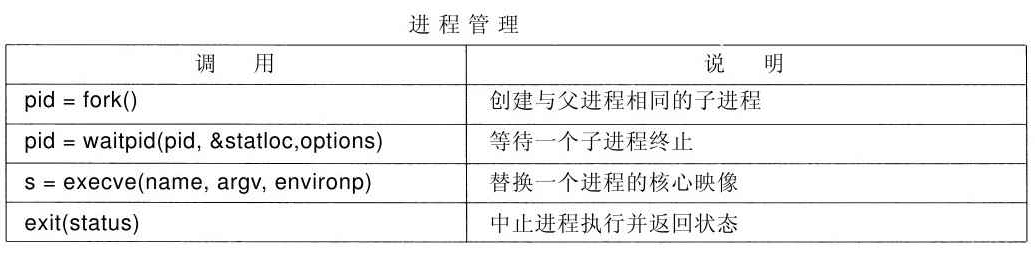
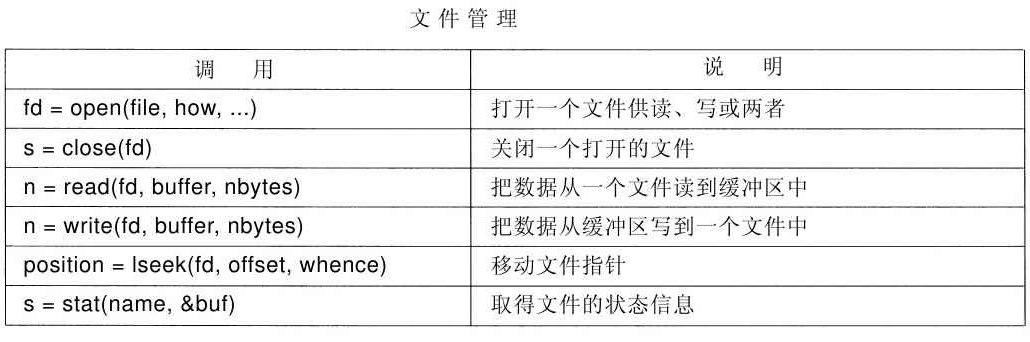
Provide services through system calls
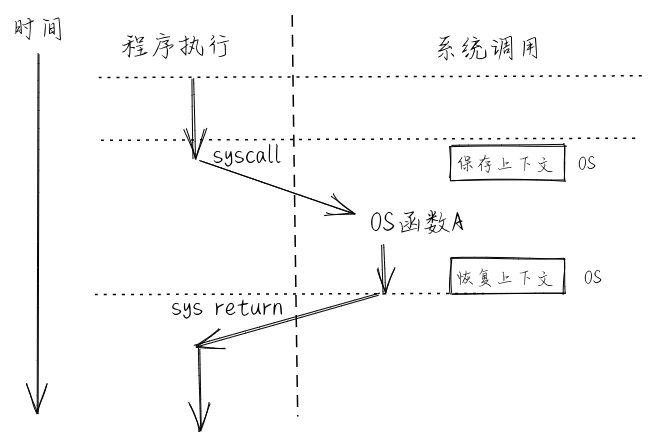
System call : OS/APP interface (one of the boundaries)
Implementation details of system calls
What happens when we call ssize_t read(int fd, void *buf, size_t count);?
Can programs in user space call functions in kernel space?
Can programs in kernel space call functions in user space?
System calls : Enhance system security and reliability
Characteristics of function calls
Advantages: fast execution;
Advantages: flexible - easy to pass and return complex data types;
Advantages: Familiar mechanisms for programmers,...
Disadvantages: Unreliable/malicious app may crash the whole system.
Address space of a Process
The address space (memory layout) of the process defines the boundary between OS and APP.
Address Space Division
The address space (memory layout) of the process defines the boundary between OS and APP.
Outline
1. The relationship between OS and hardware
2. The relationship between OS and applications
3. Isolation mechanism
Why we need isolation?
What problems can we solve through isolation?
How to achieve isolation?
Isolation can solve the following problems:
prevent program X from destroying or monitoring program Y
read/write memory, 100% CPU usage, change file descriptors
Prevent processes from interfering with the OS
Protection from malicious programs, viruses, trojans and bugs
erroneous processes may try to trick the hardware or kernel
What is Isolation?
Definition of isolation
Applications can not affect (or disrupt) the normal execution of other applications/OS. There is no information leakage in the whole system.
The Essence of Isolation
Appears only when there is a need to exchange information or share resources
Isolation doesn't mean to forbid resource/information share
Isolation Boundary
Isolation needs clear boundary.
Boundaries determine protection domain of each process
Crossing protection domains is risky for resource sharing
Mandatory isolation
Prevent the faulty part destroying the whole system
Isolated unit
Isolation methods
Classification of isolation methods
Software based isolationHardware based isolationNetwork based isolation
Classification of isolation
Control Isolation : privilege
Data Isolation : address space
User address space vs kernel address space
Time Isolation : interrupt handling
Interrupt the running App in user mode at any time
Handling of isolation violation: exception handling
OS handles the abnormal behaviors of user-mode App in kernel mode timely
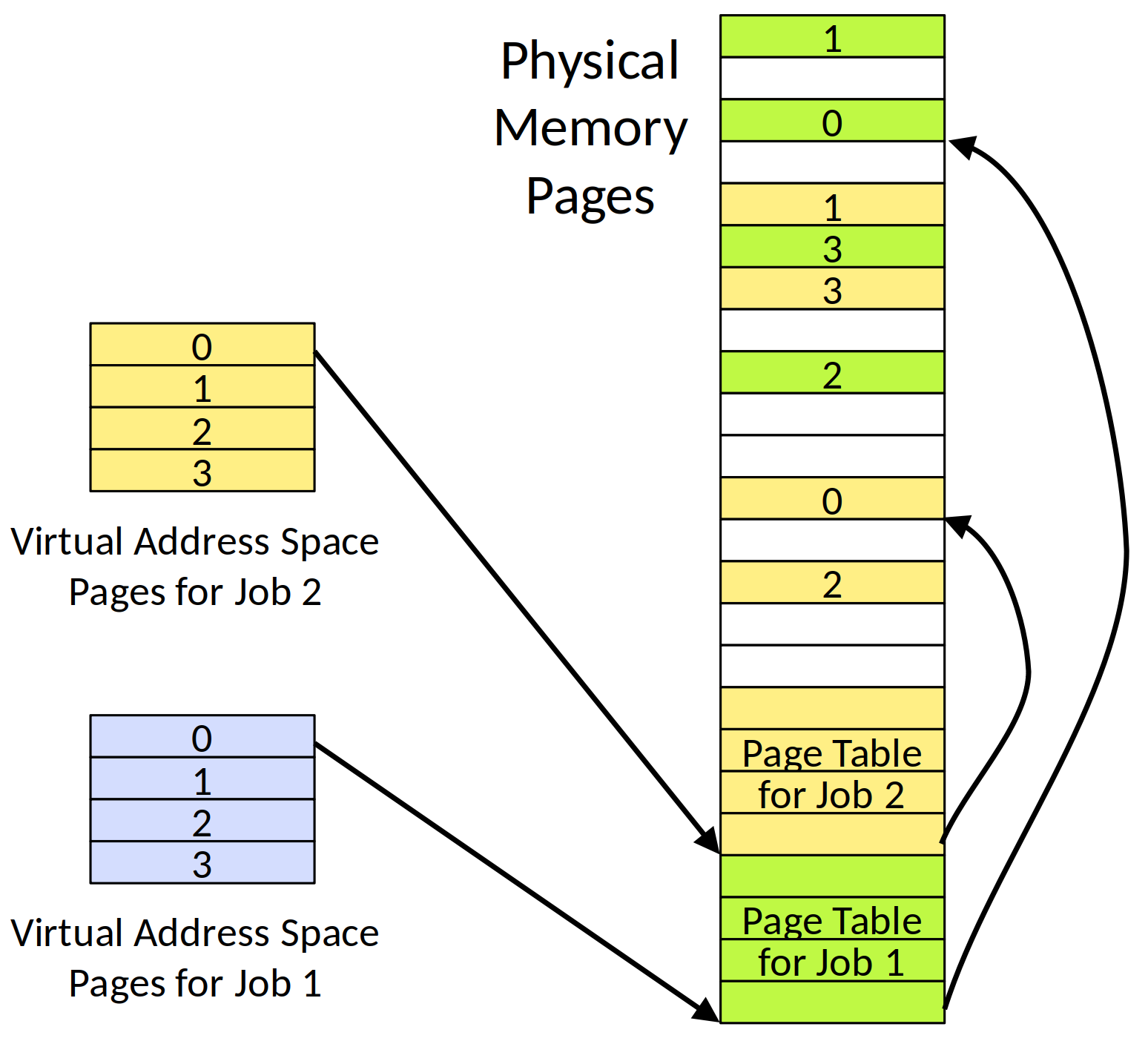
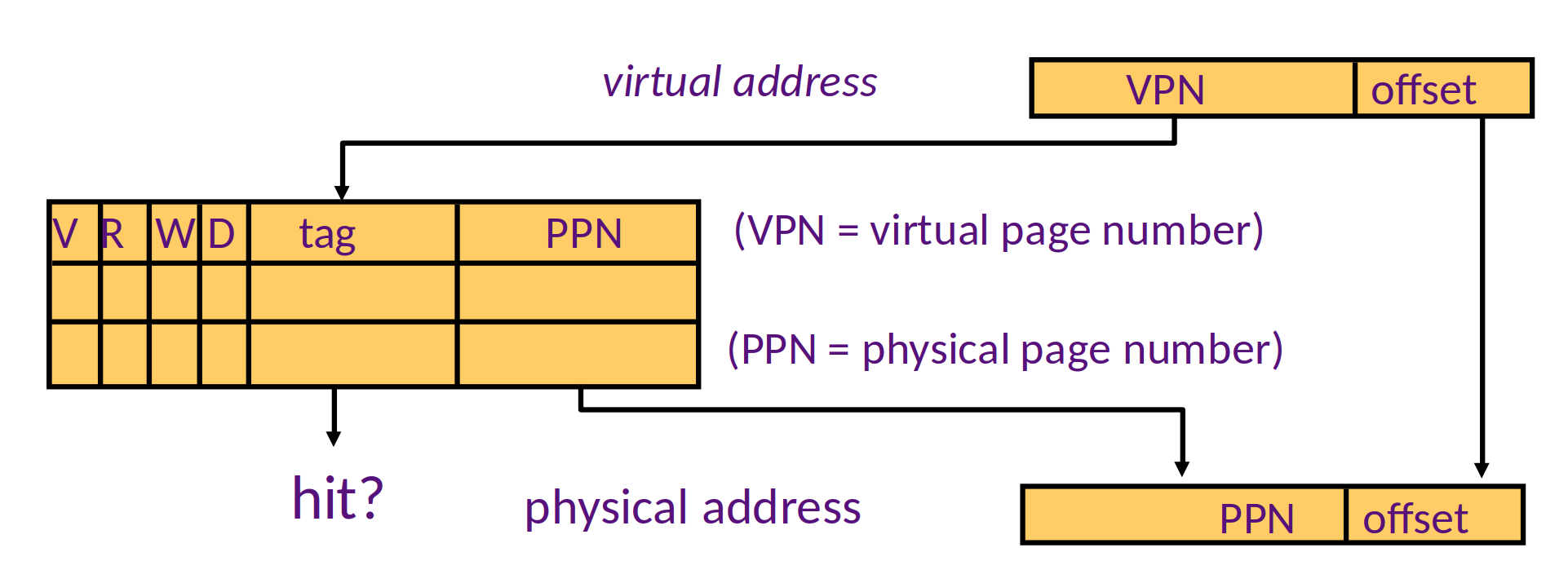
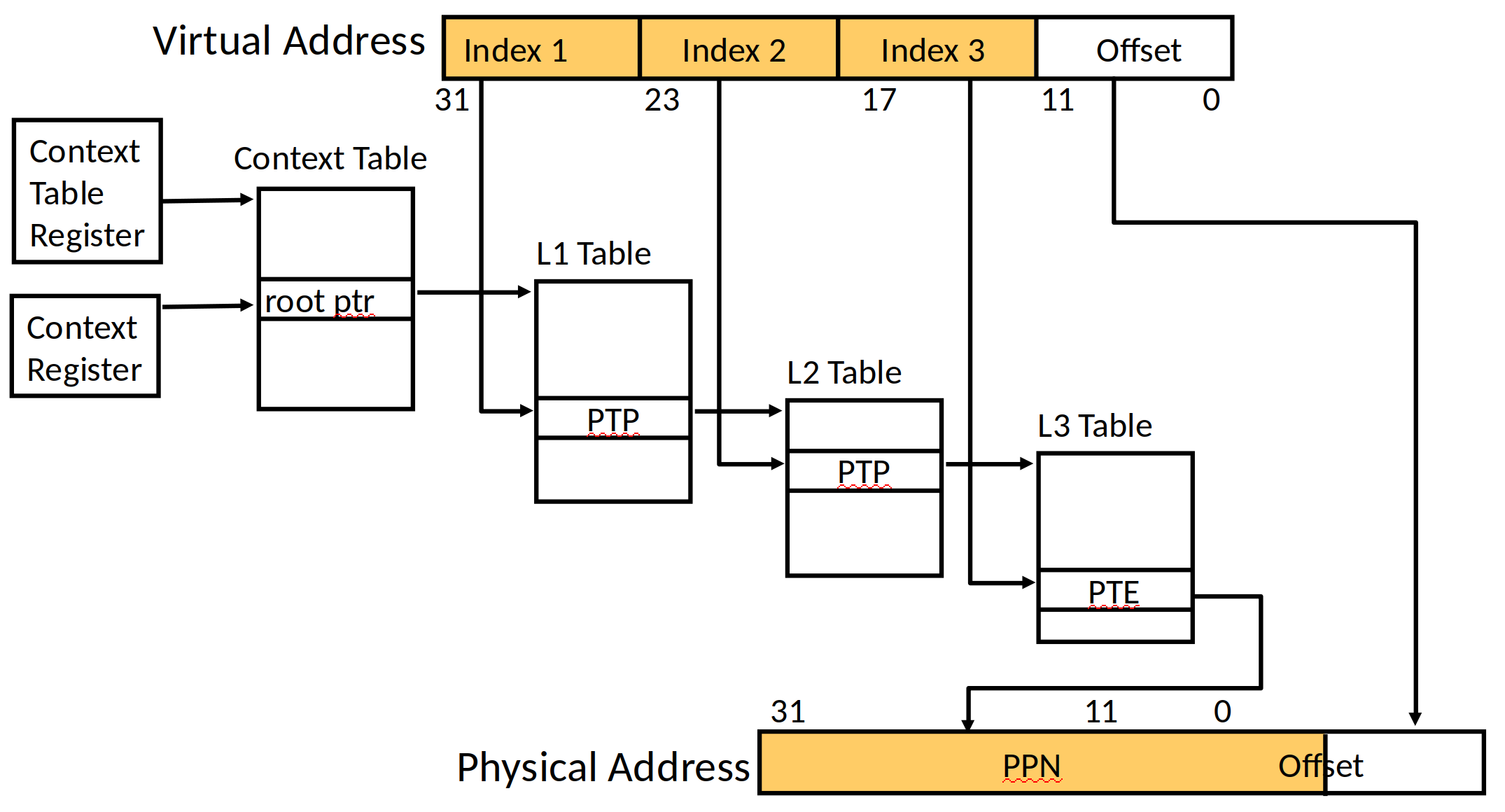
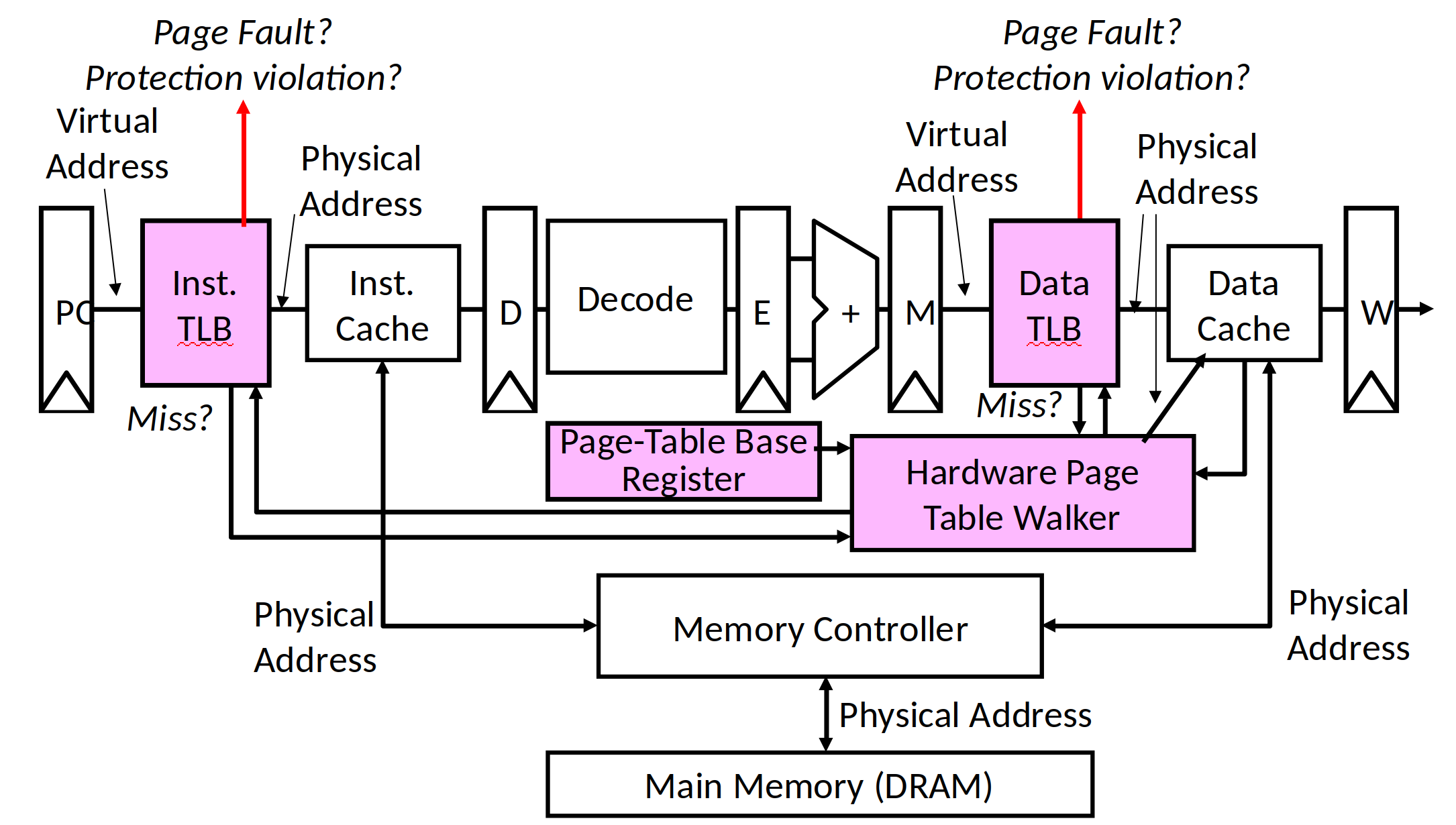
Data Isolation: Virtual Memory
Virtual Memory
Security issues of memory read/write
Security issues of Inter-Process communication
The problem of memory space utilization
The efficiency of memory read/write
Address spaces
A program can only access its own memory
A memory access request to other process's space will be denied without permission
How virtual memory works
Control Isolation: Privilege Modes
Privilege modes in CPU hardware
Prevent applications from accessing device and sensitive CPU registers
Address Space Configuration Register
Shutdown related instructions or registers
...
Privilege Modes
CPU/hardware supports different privilege modes
Kernel Mode vs User Mode
Kernel mode can perform privileged operations forbidden in user mode
Accessing peripherals
Configure address space (virtual memory)Read/write special system-level registers
OS kernel runs in kernel mode, Apps run in user mode
Every microprocessor has similar user/kernel mode flags
Time Isolation: Interrupt/Exception Mechanism
CPU/hardware supports interrupt/exception handling
Respond to and handle apps' abnormal behaviors timely
Prevent apps occupying CPU for a long time.
Interrupt occurs asynchronously , as a result of signals from external I/O devices.
Asynchronization means that hardware interrupt is not caused by any dedicated CPU instruction.
Interrupt handler
Interrupt handler (programs for handling hardware interrupts or exceptions):
I/O device sends a signal to the processor and places the exception number on the system bus to trigger interrupt;
After finishing execution of the current instruction, the processor reads the exception number from system bus, saves context, and switches to kernel mode ;
The interrupt handler is called. After it is finished, the CPU will begin to execute the next instruction in the program.
Timer Interrupt
Timer can generate interrupts in a stable and periodical manner
Prevent apps from occupying the CPU for a long time
Allow OS kernel to manage resource periodically
Interrupt Handler
Trigger interrupt
Save context, switch to kernel mode.
Return to next instruction before interrupt occurs, resume context.
Exception Handler
Get exception handling service according to the exception id
Save context
Process: Kill the program which causes exception, re-execute the exception instruction.
Resume context
System call Handler
Get system call service program
Switch from User Mode to Kernel Mode
Switch stack, save context
Execute in Kernel Mode
Return to User Mode
Interrupt vs Exception vs System call
中断 vs 异常 vs 系统调用
中断
异常
系统调用
发起者
外设、定时器
应用程序
应用程序
响应方式
异步
同步
同步、异步
触发机制
被动触发
内部异常、故障
自愿请求
处理机制
持续,用户透明
杀死或重新执行
等待和持续
Process Switching vs Function Switching
Summary
Understand the relationship between computer hardware and OS: interface/boundary
Understand the relationship between OS and applications: interface/boundary
Understand how OS achieves isolation for applications
Here I just find original sentences from UCB CS-152 slide
---
## Relationship between OS and application -- syscall
---
## Relationship between OS and application -- syscall
https://blog.csdn.net/ceshi986745/article/details/51787424
Ape Science~Six isolation techniques that programmers must know
---
---
## Isolation mechanism -- the main isolation method -- virtual memory
## Isolation mechanism -- the main isolation method -- virtual memory
---
## Isolation mechanism -- the main isolation method -- virtual memory
---
## Isolation mechanism -- the main isolation method -- virtual memory
#### 异常处理例程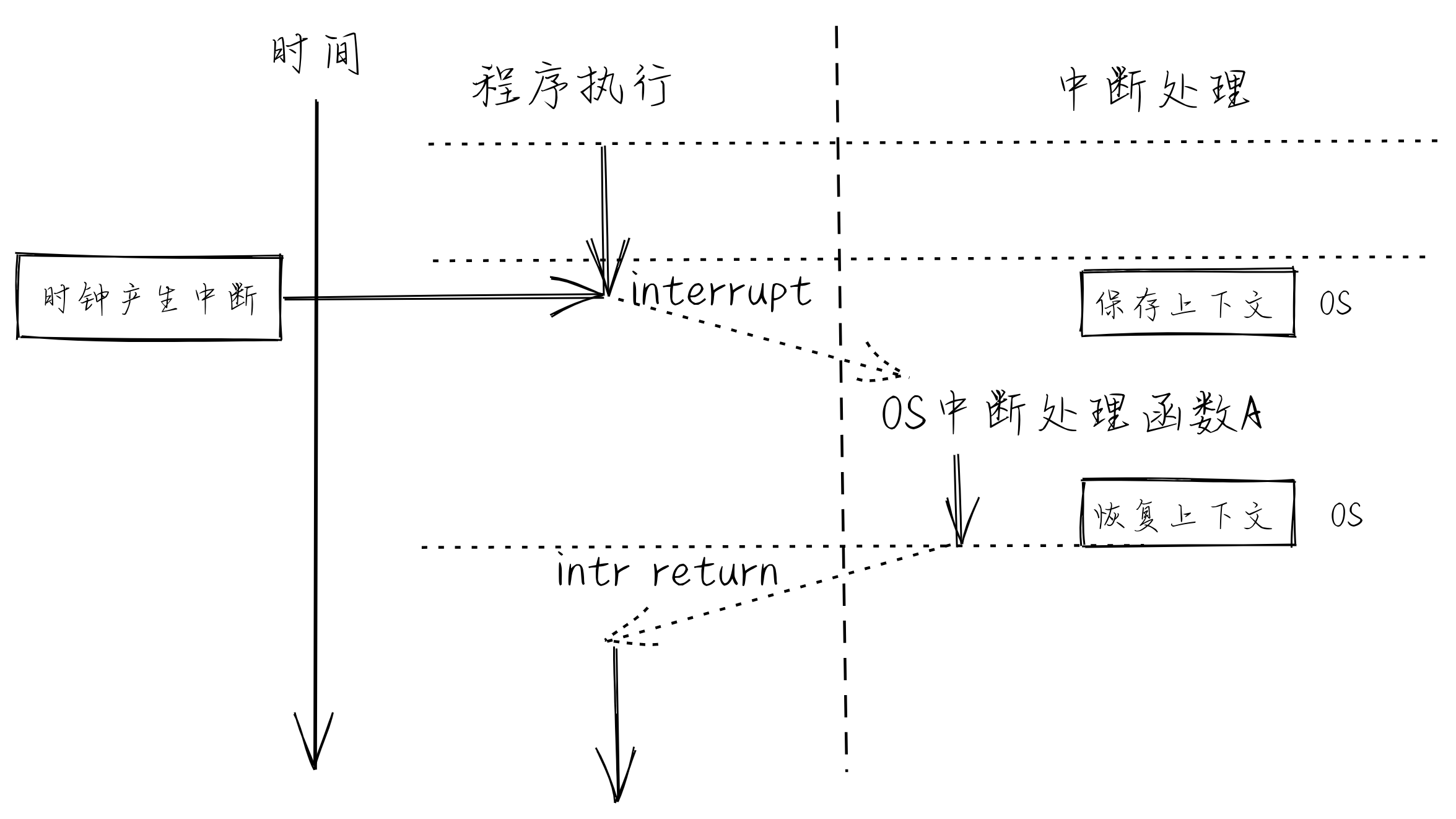

#### 系统调用处理例程